
Printing with TPU and Flexible Filaments: A Modern and Practical Guide
Learn how to master TPU and flexible filament printing with lessons about keeping it dry, controling flow and retraction, and optimizing settings.
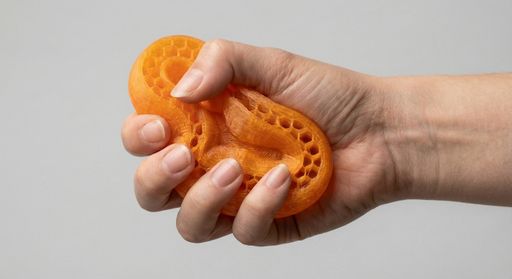
Flexible filaments—most commonly TPU (Thermoplastic Polyurethane), but also other TPE-family materials—unlock a category of parts that rigid plastics simply can’t do well: grippy surfaces, impact-absorbing bumpers, vibration isolators, seals, and wearable/ergonomic components. They’re often described as “printable rubber,” but the reality is more nuanced: flexibles behave differently in the extruder, in the hotend, and on the build plate, and success comes from managing those differences intentionally.
This guide consolidates proven TPU fundamentals and adds modern considerations for today’s faster printers and ecosystems—especially Bambu Lab printers and Bambu Lab TPU.
What “Flexible Filament” Really Means
Most flexible 3D printing filaments are thermoplastic elastomers (TPEs)—materials engineered to behave like rubber while still melting and re-solidifying like a thermoplastic. TPU is the most common subtype because it balances:
- Elasticity (bend/stretch and return)
- Toughness & impact resistance
- Abrasion/wear resistance
- Good layer bonding when printed correctly
A key spec you’ll see is Shore hardness (often Shore A). Lower numbers are softer and more elastic, but also harder to print fast.

When TPU Is the Right Material (and when it isn’t)
TPU shines when you need one or more of the following:
- Impact resistance: phone cases, corner bumpers, protective housings
- Wear resistance: rollers, wheels, belts, cable guides
- Vibration dampening: feet, mounts, machine isolators
- Comfort & ergonomics: grips, straps, wearable parts
- Seals & gaskets: conformal contact surfaces, light-duty sealing
Where TPU is *not* ideal:
- Rigid structural parts (brackets, frames) where stiffness matters
- High-temperature environments (unless using specialty high-temp elastomers)
Precision snap-fits that rely on crisp edges (TPU can “round” details)
The Big Three: Dryness, Filament Path, and Speed
If you remember only three things about TPU printing, make it these:
Keep TPU dry (more important than most people think)
TPU is typically hygroscopic. Moisture causes:
- popping/sizzling during extrusion
- stringing and surface pitting
- weaker parts (steam disrupts extrusion and polymer chains)
Drying baseline: around 135°F / 57°C for ~6 hours (common starting point).
Bambu Lab printers: many models include a built-in drying function (often cited around ~70°C for ~12 hours for TPU). Use it—especially if the spool has been out for days.
Practical tip: If you’re chasing stringing and you haven’t dried the spool recently, dry it first before changing 10 slicer settings.
Constrained filament path matters more than “direct drive vs Bowden”
The old myth was “Bowden can’t print TPU.” The more accurate rule is:
TPU needs a well-constrained filament path so it can’t buckle, kink, or escape sideways under compression.
• Modern extruders with tight guidance can print TPU very well.
• Older/open-path extruders often require very low or zero retraction to avoid jams.
Slow down (or more precisely: limit volumetric flow)
Flexible filament behaves like pushing a rope: the harder/faster you push, the more it wants to buckle.
A modern way to control this is max volumetric speed (mm³/s).
On Bambu Studio/OrcaSlicer-style workflows, a common starting point is around ~3.2 mm³/s, then adjust in small steps (±0.2 mm³/s) until extrusion is stable.
 Wet Filament
|
 Dry Filament
|
Retraction: Use the Minimum That Works
Retraction is often the #1 cause of TPU headaches because the filament stretches and compresses.
General guidance:
- Start with minimal retraction distance
- Increase slowly only if stringing persists *after drying*
- If you see under-extrusion after travel moves, retraction is often too aggressive
On printers with very constrained paths, you can sometimes run retraction closer to “normal” materials—but TPU still usually prefers less.
First Layer and Bed Adhesion: Choose the Right Plate + Adhesive Strategy
TPU can stick *too well* to some surfaces, and not well enough to others. Your goal is reliable adhesion during printing plus safe release afterward.
Common successful approaches:
- Textured PEI: often excellent at relatively low bed temps (e.g., ~35°C range on some setups)
- Engineering/utility plates: often work well with a glue stick layer (glue can act as both adhesion promoter and release barrier)
- Glass + PVA glue stick: classic, reliable option
Bambu-specific note: Many users get consistent results by pairing the correct Bambu plate with the recommended bed temp and (when needed) Bambu glue stick.
Temperature: Start in the Middle, Tune in 5°C Steps
A practical starting point for many TPUs is ~235°C nozzle, then tune in ±5°C increments.
- Too hot: more stringing, oozing, “cobwebs,” blobby corners
- Too cool: weak layer bonding, rough extrusion, sparse perimeters/infill
Bed temps vary widely by plate and TPU formulation, but many setups land in the ~30–60°C range.
Designing for Flex: Infill, Walls, and Geometry Matter
With TPU, slicer settings don’t just affect strength—they affect *feel*.
- Lower infill = more flex (e.g., 5% feels dramatically softer than 50%)
- More walls = stiffer shell even if infill is low
- Thicker sections become “springy blocks” rather than flexible skins
If you’re printing something like a gasket, bumper, or grip, prototype with multiple infill/wall combinations—it’s often faster than trying to predict the final feel.
Bonus: Bambu Lab TPU and High-Speed Printer Considerations
High-speed printers (including many Bambu Lab models) change the TPU conversation in two ways:
1) Flow limits become the main speed control
Instead of setting “30 mm/s everywhere,” you often get better results by limiting max volumetric speed and letting the slicer manage motion.
2) Multi-part plates can amplify stringing
TPU strings easily during long travel moves. If you must print multiple parts:
- reduce travel opportunities (layout matters)
- consider printing “by object” (when safe/possible) to reduce cross-part travel
- keep filament dry and retraction conservative
AMS note: Some TPUs (including certain MatterHackers TPUs) are reported as AMS-compatible, but flexible filament in any multi-feed system can be more sensitive to drag and tight bends. If you see feed issues, an external spool holder with very low friction can be the simplest fix.

Quick Troubleshooting Map
- Stringing - Try in this order:
- Dry the filament
- Reduce travel between separate objects (or print one at a time)
- Lower nozzle temp in 5°C steps
- Increase retraction slightly (small increments)
- Under-extrusion / inconsistent flow
- Reduce volumetric speed / slow down
- Reduce retraction distance/speed
- Increase nozzle temp slightly
- Confirm spool feeds smoothly (low-friction holder)
- Bed adhesion problems
- Clean plate, then add glue stick where appropriate
- Add brim/skirt to prime and increase contact area
- Adjust bed temp in small steps (±5°C)
- Re-check Z-offset/first-layer squish (avoid over-squish on surfaces where TPU can “weld”)
A Solid “First TPU Profile” (Starting Point)
Use this as a baseline, then tune:
- Dry TPU first
- Nozzle: ~235°C (tune ±5°C)
- Bed: ~30–60°C depending on plate (often lower on textured PEI)
- Max volumetric speed: start ~3.2 mm³/s (tune ±0.2)
- Retraction: minimal; increase only if needed
- Cooling: moderate after first layers (balance stringing vs layer bonding)
- Print one object at a time when dialing in settings

This star chart is based upon our PRO Series TPU. As you can see, it rates a 5 in Impact Resistance.
In Closing: TPU Success Is Mostly Process Control
TPU isn’t “hard,” it’s just less forgiving: moisture, retraction, and excessive flow show up immediately in print quality. Once you control those, flexible filament becomes one of the most useful materials you can keep loaded—especially now that printers like Bambu Lab machines make consistent extrusion and first layers easier, and Bambu Lab TPU expands the plug-and-play ecosystem for flex parts.
If you have any further questions or issues, contact support@matterhackers.com