
Inside the Machine Shop: How CU Boulder Uses WAZER to Bridge the Gap Between Classroom and Career
See how CU Boulder's aerospace engineering program uses WAZER desktop waterjets to teach real-world fabrication, from satellite parts to CubeSats.

At the University of Colorado Boulder, the Ann and H.J. Smead Aerospace Engineering building houses more than lecture halls. Its machine shop is where students turn design files into flight hardware, building everything from CubeSats and weather balloons to unmanned aerial systems and satellite payloads. It is a space built to mirror industry, and increasingly, it relies on a machine that fits on a desktop.
Bobby Hodgkinson, an instructor in the department, helped select the equipment for the new building. Laser cutters were an easy call. But the program also needed a way to cut harder materials like aluminum and carbon fiber, without requiring the advanced training that traditional milling demands. That is where a small, affordable desktop waterjet earned its place in the shop.
Taking the Load Off Traditional Machines
Hodgkinson expects the waterjet to significantly reduce demand on the shop's mills, particularly for two and two-and-a-half dimensional parts where students simply need to cut a shape and drill a few holes. The department regularly works with eighth-inch and quarter-inch aluminum, along with a growing amount of prepreg carbon fiber. In a student prototyping environment, the range of materials students bring to the table is wide open, and the shop needs equipment that can keep pace.
"Being in a student prototype environment, the students come up with everything," Hodgkinson explains. "Their palette of tools is open, so we need to be able to meet that need and cut into everything. A waterjet fills that need."
Desktop Footprint, Real Capability
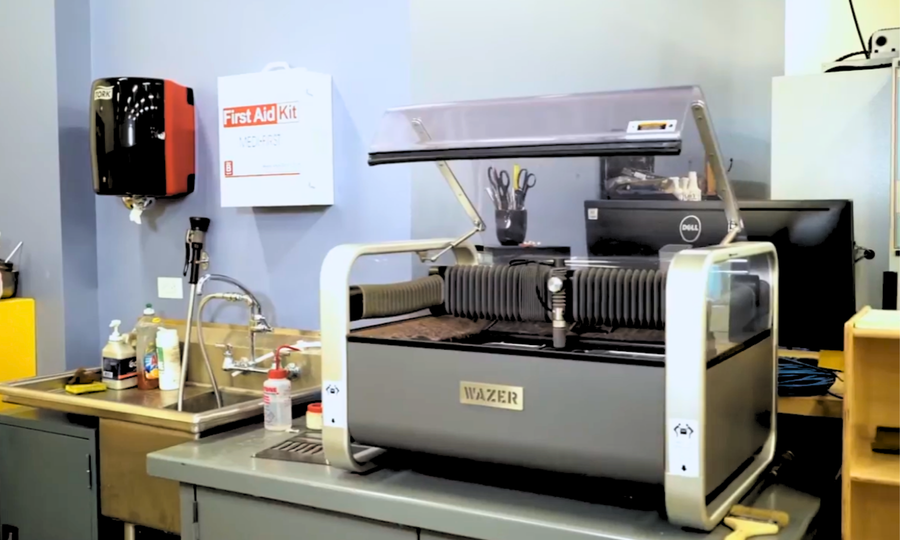
For a university shop, space and safety matter as much as capability. Hodgkinson notes that compared to other waterjets he has seen, which tend to be large, industrial machines, the desktop footprint and size of this one made it a natural fit for the CU Boulder facility.
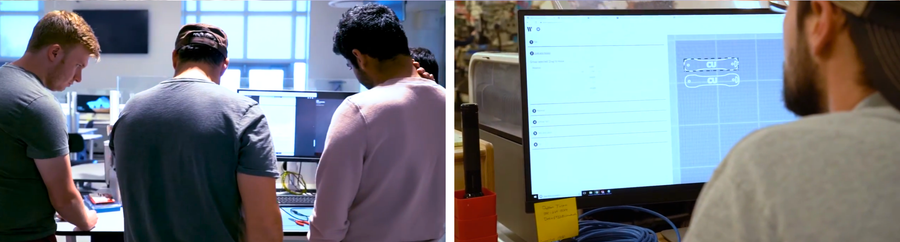
The workflow is simple enough for students to pick up quickly. The shop typically builds a DXF file, brings it into WAM software, and moves through a short set of clear, binary decisions: does the part need a tab, does it need a lead-in. From there, students take the file to the machine and follow a straightforward set of procedures. According to Hodgkinson, the fastest a student has gone from a line drawing to a running program is about 45 seconds.
Solving a Problem the Shop Didn't Know It Had
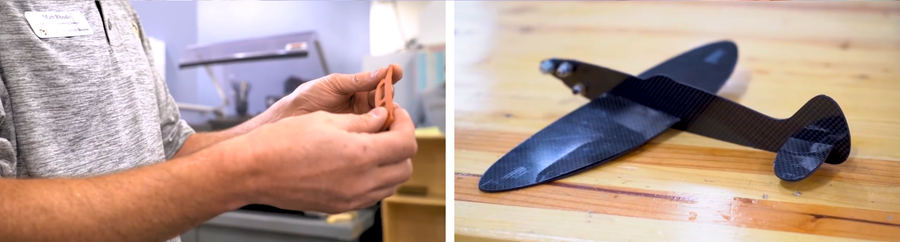
One project brought an unexpected benefit into focus. A student needed to cut a gasket for a small satellite headed into orbit, out of a soft, flexible material. Cutting flexible materials cleanly had always been a challenge with the shop's other equipment. The waterjet handled it without issue.
"We got an ability that we didn't even know we were getting," Hodgkinson says, "and it's a great ability."
Why It Matters for Engineering Education
The CU Boulder machine shop reflects a broader shift in how engineering programs equip their students. Aerospace students are not working with a narrow set of materials or part geometries. They are designing for flight, for orbit, and for real-world testing, which means the shop needs to accommodate metals, composites, and flexible materials, often within the same semester and sometimes within the same project.
A desktop waterjet gives programs like this the ability to cut across that range without requiring the training time, floor space, or safety oversight that traditional milling or industrial waterjet systems demand. Students can move from a CAD file to a finished part in minutes, freeing up instructor time and machine shop capacity for the more complex work that still requires it.
Choosing Between the WAZER Desktop and WAZER Pro
Programs exploring a WAZER for their own shop have two models to consider, and the right one comes down to what a department needs to produce. The WAZER Desktop, the model in use at CU Boulder, is built around accessibility. Its compact size lets it sit directly on a workbench, and it is designed to bring waterjet cutting into spaces that were never built to house industrial equipment, which makes it a natural entry point for university shops, classrooms, and programs just adding waterjet capability for the first time.
The WAZER Pro is built for programs that need to push further on throughput and material range. It cuts noticeably faster, handles thicker material, including aluminum up to an inch thick and steel up to ⅜ inch, and supports longer continuous cutting sessions before the abrasive hopper needs a refill. For a department running multiple lab sections back to back, supporting research projects with tighter production timelines, or working with thicker structural materials as part of an advanced curriculum, that added capacity can make a real difference.
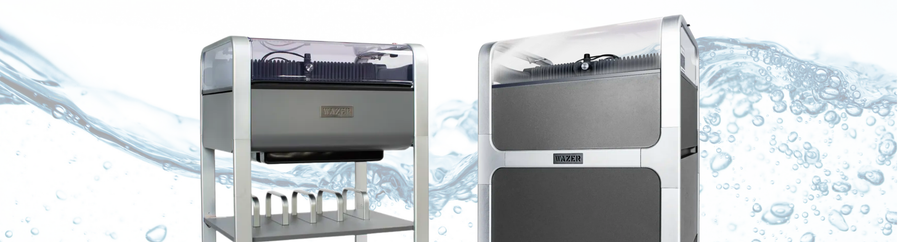
Neither model is a lesser version of the other. They are built around different priorities. The WAZER Desktop is optimized for footprint, accessibility, and ease of entry, which is exactly what a shop like CU Boulder's needed when balancing waterjet cutting against space for laser cutters, mills, and everything else students use. The WAZER Pro is optimized for speed and capacity, which suits programs where volume or material thickness is the bigger constraint. Many departments start with the accessibility of the Desktop and grow into the Pro's capacity as their program's needs expand.
Setting Programs Up for Long-Term Success
For departments considering a WAZER for their own shop, MatterHackers offers both the WAZER Desktop and the WAZER Pro, the latter built for programs that need faster cut rates and the ability to handle thicker material like 1-inch aluminum or ⅜-inch steel. Both machines share the same compact footprint and enclosed, cold-cutting design that made the WAZER a fit for the CU Boulder shop in the first place, so departments can choose the model that matches their throughput needs without sacrificing that classroom-friendly footprint.

The equipment itself is only part of the equation, though. Institutional shops also need to think about setup, training turnover as staff and students change year to year, and keeping a machine running reliably across semesters of heavy use. MatterHackers Launchpad offers virtual expert consultation to help a team get through machine setup, calibration, and that first cut without the guesswork, available for both the WAZER Desktop and WAZER Pro, with extended sessions for departments that want to go further into material optimization and workflow best practices. Beyond initial setup, Routine Maintenance Packs and extended warranty coverage give departments a way to plan for the wear and tear of a shop that runs year-round, and bundle options package the essentials, from abrasive and spare cut beds to setup assistance, so a program can outfit a lab and start cutting parts without piecing everything together individually.
For engineering departments building out new labs and shops, or looking to modernize existing ones, the CU Boulder experience offers a clear takeaway: sometimes the right tool for a student-driven, anything-goes prototyping environment is not the biggest or most industrial option, but the one flexible enough to say yes to whatever the students bring in next. And having the right support behind that purchase makes it that much easier to keep saying yes.