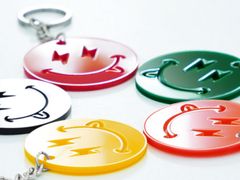
xTool xTool M2 Color Craft Laser Cutter & Engraverx - Color Print & Cut Bundle - 20W


The xTool M2 is an all-in-one color craft machine that makes creative projects easier than ever. It combines full-color printing, laser engraving, and precision blade cutting in a single, compact, workspace-friendly unit. With dual cameras and smart positioning built right in, the M2 takes the guesswork out of setup so you can focus on making.
- 3-in-1 versatility: full-color printing, laser engraving, and blade cutting in one machine.
- Dual cameras with smart positioning for accurate, repeatable results every time.
- Compact footprint designed to fit comfortably in home studios, classrooms, and small businesses.
- Ideal for DIY gifts, home decor, wedding projects, retail products, and more!
Jump To:
Print It. Cut It. All in One Machine.
The xTool M2 Color Craft is an enclosed desktop laser cutter and engraver that also prints in full color. Swap the magnetic toolhead and the same machine lays down CMYK artwork on paper, cardstock, wood, felt, or leather, then cuts and engraves that exact piece without moving it. Two built-in cameras line the laser up with what you printed, so color graphics and cut lines match on the first try.
It handles more than 300 materials, cuts up to 10 mm basswood with the 20W module, and engraves at up to 600 mm/s. Air assist and fume extraction are built in, and the Class 1 enclosure with a lid safety stop and flame detection makes it practical for classrooms, makerspaces, and shared studios.
| 16.7" x 12.5" Work area |
10W or 20W Diode laser module |
600 mm/s Max engraving speed |
CMYK Full-color printing |
Class 1 Enclosed laser safety |
How Print and Cut Works
The M2 uses magnetic, swappable toolheads. Drop in the CMYK inkjet module and the machine prints your full-color design. Swap back to the laser module and it cuts the outline or engraves detail on the same piece, still sitting in the same spot on the bed. The cameras handle alignment, so you are not taping registration marks or guessing at offsets.
- Prints on porous materials: Paper, cardstock, sticker stock, wood, felt, fabric, and leather
- Does not print on: Metal, glass, and ceramic, because the ink will not adhere to dense, non-porous surfaces
- Print area: 13.7" x 11.8" (348 x 300 mm), slightly smaller than the laser work area
- Cartridge yield: Up to 1,280 pages per color for cyan, magenta, and yellow, and up to 1,080 pages for black, per xTool
Choose Your Toolhead
Every module swaps in magnetically, with no tools and no recalibration.
| Module | What it does | Best for | Cutting capability |
|---|---|---|---|
| 10W Diode Laser | Cuts and engraves wood, acrylic, leather, paper, felt, and more | Everyday crafting, signage, ornaments, and classroom projects | Up to 8 mm basswood, 3 mm opaque acrylic |
| 20W Diode Laser | Same materials with more power and fewer passes | Thicker stock and higher-volume production | Up to 10 mm basswood, 8 mm opaque acrylic |
| 3W IR Laser (sold separately) | Marks metal and plastics that blue diode lasers cannot mark | Stainless steel, aluminum, tumblers, tools, and plastic parts | Marking and engraving only |
| CMYK Print Module | Prints full-color artwork directly onto porous materials | Stickers, cards, packaging, printed wood and felt goods | Printing only |
Blue diode lasers cannot cut clear or transparent acrylic. Use opaque or dark acrylic for cutting.

Two Cameras, No Guesswork
A 16 MP wide-view camera shows the whole bed on screen, and a 5 MP close-view camera on the toolhead handles fine positioning. Place your material anywhere on the bed, drag your design onto the live preview, and run the job. Batch fill copies one design across a tray of blanks, so you can run a full sheet of ornaments or coasters without building a jig.
- Live on-screen preview of the full bed
- Positioning precision of 0.01 mm
- Batch fill for repeat runs on multiple blanks
- Automatic recognition of xTool materials with QR codes
Built for Shared Spaces
The M2 is fully enclosed and Class 1 rated, with laser-safe tinted acrylic and a lid switch that stops the job the moment the lid opens. A dedicated flame-detection camera watches the work area and pauses the machine if it sees a flare-up. Air assist and an exhaust fan with hose are built in, so smoke and fumes leave the enclosure instead of your room.
- Class 1 enclosure, safe to operate with kids and pets nearby
- Lid-open safety stop
- Flame detection with automatic pause
- Built-in air assist and exhaust, no extra accessory needed


For Everyday Makers at Home and Beyond
Whether you are a hobbyist crafting personalized gifts, a small business owner creating retail products, or an educator inspiring students, the xTool M2 is built to make professional-quality results accessible to everyone. Its user-friendly design and compact form factor make it a natural fit for home studios, craft fairs, classrooms, and more.
- Intuitive workflow suited for beginners and experienced makers alike.
- Compact design fits comfortably on a desk or craft table.
- Versatile enough for gifting, decor, jewelry, wedding projects, and small business production.
300+ Materials, One Workspace
Cut and engrave wood, acrylic, leather, felt, paper, cardstock, slate, and coated metal. Print full color on the porous ones. With the optional IR module you can also mark bare metal and plastics, and with the RA3 Lite rotary you can engrave tumblers, bottles, and other cylinders. Objects up to 100 mm tall fit on the bed without a riser.
- Custom gifts: ornaments, coasters, keychains, and jewelry
- Paper goods: stickers, cards, invitations, and packaging
- Signage and decor in wood, acrylic, and slate
- Classroom projects across art, design, and STEM
Software That Does the Setup
xTool Studio is free and included, for Mac and PC, connecting over USB-C or Wi-Fi. Its material library covers more than 1,300 materials with over 110,000 tested parameter combinations, so most jobs run without test cuts. Built-in design elements, project files, and AI tools help get a design on the bed quickly, when you are working through a batch of orders.
- 1,300+ materials with tested cut and engrave settings
- 3,000+ built-in design elements and project files
- USB-C or Wi-Fi connection
- Step-by-step tutorials built into the software
What's in Each Bundle?
Every bundle is available with the 10W or 20W diode laser module. The machine power you select sets how thick a material you can cut; the package you select decides which extra toolheads and accessories come with it.
|
Standalone
xTool M2 Color Craft laser Best for cutting and engraving, with the option to add color later |
Color Print & Cut Bundle
Everything in Standalone Best for full-color print-and-cut work in one machine |
Deluxe Bundle
Everything in Color Print & Cut Best for adding tumblers, bottles, and other cylinders |
All-in-One Bundle
Everything in Deluxe Best for a complete print, cut, engrave, and air-filtration setup |


- 10W or 20W laser module: 10W cuts up to 8 mm basswood and 3 mm opaque acrylic; 20W cuts up to 10 mm basswood and 8 mm opaque acrylic
- CMYK Print Module: Full-color printing on paper, cardstock, wood, felt, and other porous materials
- RA3 Lite Rotary Attachment: 360-degree engraving on tumblers, bottles, and other cylinders
- Desktop Air Purifier: Filters smoke, particles, and odors when venting the machine outdoors is not practical
- Every machine includes: The laser module you select, power adapter, USB-C cable, exhaust hose, magnetic fixtures, starter material pack, and basic tools
Frequently Asked Questions
Is the M2 a printer or a laser?
Both. It is a diode laser cutter and engraver with a swappable CMYK inkjet module, so one machine prints a design in full color and then cuts or engraves it.
What can the color module print on?
Porous materials such as paper, cardstock, sticker stock, wood, felt, fabric, and leather. Ink will not adhere to metal, glass, or ceramic.
What is the difference between the 10W and 20W laser?
Power. The 10W cuts up to 8 mm basswood and 3 mm opaque acrylic. The 20W cuts up to 10 mm basswood and 8 mm opaque acrylic, and gets through the same material in fewer passes.
Can it cut clear acrylic?
No. Blue diode lasers pass straight through clear and transparent acrylic. Use opaque or dark acrylic instead.
Can it engrave metal?
Coated and painted metals engrave with the diode laser. For bare stainless steel, aluminum, and most plastics, add the 3W IR laser module.
Do I need ventilation?
Air assist and an exhaust fan are built in, and an exhaust hose is included. Vent it out a window or door, or pair it with a desktop air purifier for rooms where outside venting is not an option.
Is it safe for a classroom?
The M2 is a Class 1 enclosed laser. The lid switch stops the job if the lid opens, a flame-detection camera pauses the machine if it sees a flare-up, and fumes are extracted through the built-in exhaust. Adult supervision and proper venting are still required.
Can it engrave tumblers and bottles?
Yes, with the RA3 Lite rotary attachment, which is included in the Deluxe Bundle. Objects up to 100 mm tall also fit directly on the bed without a riser.
What are the ongoing costs?
The CMYK ink cartridge is the main consumable. xTool rates it at up to 1,280 pages per color for cyan, magenta, and yellow, and up to 1,080 pages for black.
Technical Specifications
| Specification | Details |
|---|---|
| Machine Type | Enclosed desktop diode laser cutter and engraver with color printing |
| Laser Modules | 10W or 20W blue diode (455 nm); 3W IR laser module sold separately |
| Work Area | 16.7" x 12.5" (426 x 320 mm) |
| Print Area (CMYK module) | 13.7" x 11.8" (348 x 300 mm) |
| Max Cutting Capacity | 10W: 8 mm basswood, 3 mm opaque acrylic. 20W: 10 mm basswood, 8 mm opaque acrylic |
| Max Object Height | 100 mm (3.9") without a riser |
| Max Engraving Speed | 600 mm/s |
| Positioning Precision | 0.01 mm |
| Cameras | 16 MP wide-view, 5 MP close-view, plus a dedicated flame-detection camera |
| Air Assist and Exhaust | Built in, exhaust hose included |
| Laser Safety Class | Class 1 enclosed, with lid-open safety stop |
| Connectivity | USB-C and Wi-Fi |
| Software | xTool Studio (Mac and Windows), 1,300+ material presets |
| Supported Materials | 300+ including wood, opaque acrylic, leather, felt, paper, cardstock, slate, and coated metal |
| Machine Dimensions | 24.0" x 22.4" x 7.1" (610 x 569 x 180 mm) |
| Weight | 27.1 lb (12.3 kg) |