
How to Print TPU and Flexible Filament on Your Bambu Lab 3D Printer
Flexible filaments like TPU (Thermoplastic Polyurethane) offer unique properties ideal for applications requiring ductility and elasticity. This article provides essential guidelines for successfully printing TPU and other flexible filaments on your Bambu 3D printer, covering filament preparation, printer setup, optimal settings, and troubleshooting tips to ensure high-quality prints.
Flexible filaments, such as TPU (Thermoplastic Polyurethane), offer unique properties that make them ideal for specific applications where ductility and elasticity are required. Printing with these materials on your Bambu 3D printer can be straightforward if you follow some essential guidelines. Here’s how you can achieve great results with TPU and other flexible filaments.
Understanding Flexible Filaments
Flexible filaments, like TPU, combine plastic polymers with rubber polymers to create a Thermoplastic Elastomer (TPE). This category includes various materials with different properties such as shore hardness and elasticity. These filaments are essentially printable rubbers, allowing for the creation of complex, elastic designs.
Key Tips for Success with Flexible Filaments on Bambu 3D Printers
Preparing your TPU Filament
- Keep Filament Dry
- Flexible filaments are hygroscopic and can absorb moisture from the air, leading to poor print quality. Dry your filament at 135°F for six hours in a conventional oven or use a PrintDry system to maintain dryness. Moist filament can cause popping and sizzling during extrusion, resulting in weak and visually flawed prints.
- You can also dry filament using the built in Bambu Printer drying system.
| Wet Filament | ||
|---|---|---|
 |
||
| Dry Filament | ||
 |
Preparing Your Bambu Lab Printer
- Use the Right Build Plate:
 |
The textured PEI plate has great bed adhesion at 35°C. |
|---|---|
 |
Bambu Engineering Plate The engineering plate has great bed adhesion with the Bambu glue stick applied at 30°C. |
 |
Bambu High Temp Plate The high temperature plate has great bed adhesion at 35°C. |
 |
Bambu Cool Plate The cool plate had great adhesion at 30°C. |
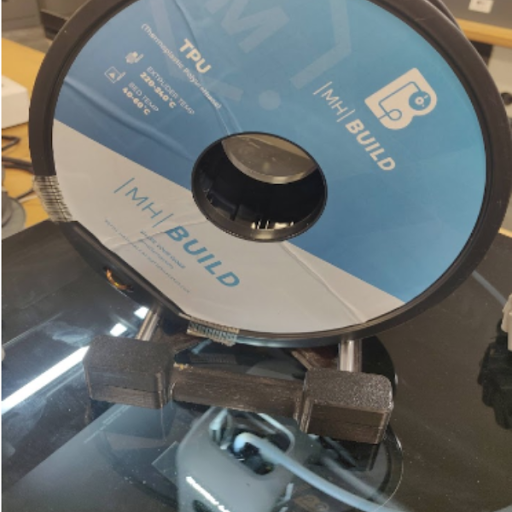
- Use an Effective Filament Spool Holder
- AMS
- MH Build and Pro Series TPU are compatible with AMS
- Bambu External Holder
- The Bambu spool holder that mounts on the back of the printer works with most filament rolls
- Other Spool Holders
- a printable spool holder that uses ball bearings for smoother rolling will also give great results and should fit any spool
- AMS
Choosing the Best Settings
- Avoid putting separate parts on the same plate to minimize stringing
-
- Movements between these parts are likely to cause stringing with TPU
- Setting print sequence to “by object” instead of “by layer” will help eliminate such stringing

- Flexibility and Infill
-
- Keep in mind that the more infill you use, the less flexible the final product will be because it is less hollow
| 50% Infill | ||
|---|---|---|
 |
||
| 5% Infill | ||
 |
- Print Speed
- Flexible filaments require slower print speeds to avoid binding and ensure smooth extrusion.
-
- Start with 3.2 mm³/s and adjust in ±0.2 mm³/s increments.
- Temperature Settings
-
- Start printing with the nozzle at 235°C and adjust in ±5°C increments to find the optimal temperature.
- Too High: Lower the temperature if you notice stringing or excessive nozzle leakage.
- Too Low: Increase the temperature if the layers don’t bond well or the print appears sparse.
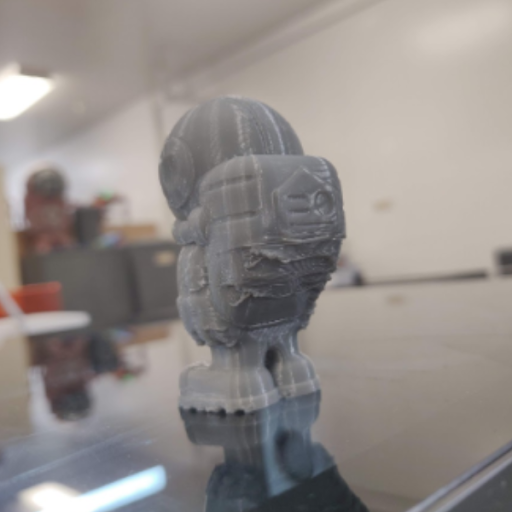 |
190°C (Too Low) |
|---|---|
 |
240°C (Good) |
 |
270°C (Too High) |
Printing
- Make sure the nozzle is clear of any debris before printing
- Use Bambu Automated Bed Leveling before each print to ensure a good first layer
Troubleshooting Issues
- Bed adhesion
-
- Apply an adhesive to the build plate such as the bambu glue stick
- You can use a skirt or brim to increase the area of contact with the build plate
- Incrementally adjust bed temperature by ±5°C
- Stringing
-
- Dry filament
- Eliminate travel between bodies on the build plate
- Incrementally adjust retraction distance by ±0.2 mm
- Incrementally adjust retraction speed by ±5 mm/s
- Incrementally adjust nozzle temperature by ±5°C
- Underextrusion
-
- Incrementally adjust retraction distance by ±0.2 mm
- Incrementally adjust retraction speed by ±5 mm/s
- Incrementally adjust nozzle temperature by ±5°C
- Incrementally decrease print speed by ±5 mm/s
- Incrementally decrease max volumetric speed by 0.2 mm
By following these guidelines, you can achieve successful prints with TPU and other flexible filaments on your Bambu 3D printer. Happy printing!