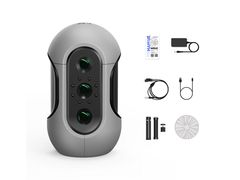
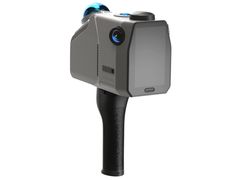
3DMakerPro 3DMakerPro Moose Lite 3D Scanner


The 3DMakerPro Moose Series is a cutting-edge medium format 3D scanner featuring 0.03mm accuracy, advanced AI and point cloud algorithms, and blue light technology for high-quality scans. It includes optical anti-shake for stability and marker-free scanning for convenience. Ideal for precise, efficient, and easy 3D scanning.
- 0.03mm true-to-life scanning accuracy for incredibly detailed captures.
- Optical anti-shake technology ensures stable, blur-free scans.
- Marker-free scanning technology eliminates setup time and complexity.
- Advanced AI and point cloud algorithms for superior data processing.
- Blue light technology provides high-quality scan results.
- Medium format scanner ideal for professional applications.
3DMakerPro Moose Series 3D Scanners
Elevating Quality, Efficiency, and Ease
3DMakerPro Moose 3D Scanner delivers 0.03mm accuracy with blue light technology, optical anti-shake, and marker-free scanning. The 3DMakerPro Moose Series represents cutting-edge 3D scanning technology with exceptional 0.03mm accuracy and advanced AI algorithms. This medium format scanner features blue light technology and optical anti-shake for stable, high-quality scans without the need for markers.
Key Features of the 3DMakerPro Moose Series 3D Scanners:
- True-to-life accuracy of 0.03mm.
- Optical anti-shake modules for stability and comprehensive coverage.
- Marker Free Technology eliminates the need for markers.
- Advanced AI tracking and point cloud algorithm for enhanced efficiency and quality.
Seamless Data Processing
Powered by sophisticated AI and point cloud algorithms that optimize scan quality automatically. The integrated optical anti-shake technology ensures stable captures even with handheld operation. Blue light technology further enhances scan precision and surface detail capture.
- AI-powered scan optimization.
- Optical anti-shake for stable results.
- Blue light technology for enhanced detail.


Advancing Precision
Capture every detail with exceptional 0.03mm accuracy that delivers true-to-life digital representations. The advanced scanning technology ensures professional-grade results for demanding applications. Whether you're digitizing prototypes, artwork, or mechanical parts, this precision level meets the highest standards.
- Professional-grade accuracy for detailed captures, with an impressive 0.05mm accuracy.
- With a resolution of 0.10mm, Moose Series scanners deliver true-to-life digital representations.
- Offering up to 100mm scan depth, Moose Series scanners excel in demanding applications.
Continued Evolution
Eliminate the tedious process of placing markers with innovative marker-free technology. Simply position your object and start scanning without any preparation or setup time. This streamlined workflow dramatically reduces scanning time while maintaining exceptional quality.
- Moose Series offers a substantial 40% improvement in accuracy and a 20% enhancement in resolution.
- Streamlined scanning workflow without markers or additional preparation required.
- Capable of scanning up to 100mm in depth, Moose Series scanners excel in exploring intricate structures.

Technical Specifications
|
Moose |
Moose Lite |
|
| Scan Performance | ||
| Accuracy | 0.03mm | 0.05mm |
| Resolution | 0.07mm | 0.10mm |
| Color Scanning | 280g | 250g |
| Light Source | Blue LED | NIR |
| Frame Rate | 10fps | 10fps |
| Tracking Mode | AI Visual Tracking | AI Visual Tracking |
| Work Distance | 150-400mm | 150-400mm |
| Single capture range | 200x100mm | 200x100mm |
| Typical Object Sizes | 15-1500mm | 15-1500mm |
| Software System Requirements | ||
| Output Format | OBJ/STL/PLY/ASC | OBJ/STL/PLY/ASC |
| Compatible System |
|
|
| Compatible Mobile |
|
|
| Minimum Computer Requirements |
|
|
| Recommended Computer Requirements |
|
|
|
Hardware Parameters |
||
| Light Source | Blue LED | NIR |
| Color Texture | 24-bit color textures | Mono color textures |
| USB Interface | USB2.0 | USB2.0 |
| Dimensions | 120×60×35mm | 120×60×35mm |
| Weight | 280g | 250g |