
Wet Filament? Here’s How to Fix It.
Learn how to spot wet 3D printer filament, dry it safely, choose the right dryer, and keep moisture from ruining future prints.

A spool of filament can look perfectly fine and still be the reason your print suddenly turned into a stringy, rough-looking mess.
Most 3D printing filaments absorb at least some moisture from the air. Over time, that moisture can cause stringing, inconsistent extrusion, rough surfaces, popping from the nozzle, and even weaker parts.
Knowing how to spot wet filament, dry it properly, and store it afterward can save a lot of unnecessary troubleshooting.
What Does “Wet Filament” Mean?
Many 3D printing materials are hygroscopic, meaning they absorb moisture from the surrounding air.
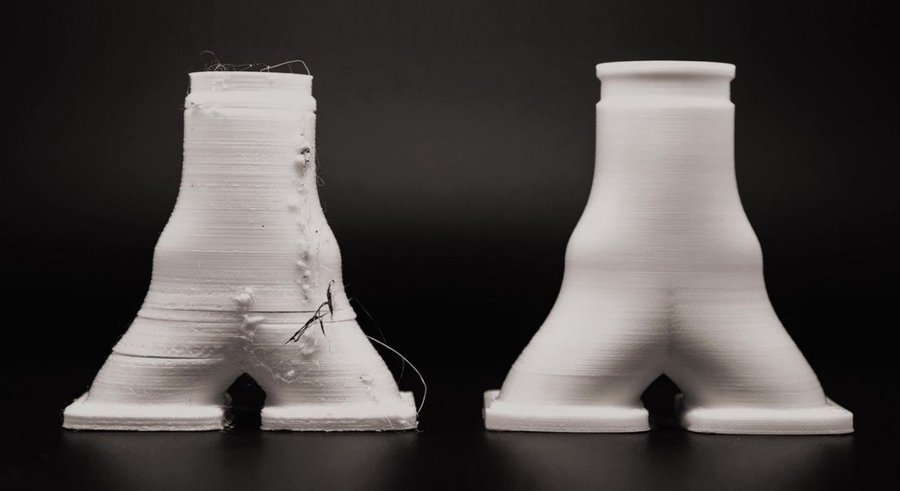
When moisture-loaded filament reaches the hotend, that water rapidly turns to vapor. This interrupts smooth extrusion and can leave visible defects in the finished print.
You may notice:
- Popping, crackling, or sizzling from the nozzle
- Extra stringing
- Rough, pitted, or uneven surfaces
- Inconsistent extrusion
- Reduced layer adhesion or part strength
Other printer problems can cause similar symptoms, but if a spool has been sitting out for a while, moisture is an easy variable to check first.

Which Filaments Need Drying?
Moisture can affect a wide range of materials, but some require a lot more attention than others.
PLA is relatively forgiving and may go quite a while without noticeable problems when stored properly.
PETG, ABS, and ASA can still absorb enough moisture to affect extrusion and surface quality over time.
TPU and polycarbonate benefit from more careful drying and storage, especially if they've been sitting exposed for a while.
Nylon, PVA, and many engineering materials are especially moisture-sensitive. Some nylon-based materials should even be dried before their first print despite arriving in sealed packaging.
If you're printing with composites like PA-CF or PA-GF, keeping the material dry before and during printing becomes particularly important.
| Filament ⇕ | Hygroscopicity ⇕ | Typical Moisture Absorption ⇕ |
|---|---|---|
| PLA | Low–Moderate | ~0.3–1% |
| PETG | Moderate | ~0.5–2% |
| PCTG | Moderate | ~0.5–2% |
| TPU / TPE | Moderate–High | ~0.3–3% (softer = more) |
| ABS | Low–Moderate | ~0.2–0.8% |
| ASA | Low–Moderate | ~0.2–0.8% |
| Nylon / PA / PA6 | Very High | ~2.5–9.5% |
| PA12 | Low (for a nylon) | ~0.25–1% |
| PAHT | High | ~2–9% |
| PVA | Extreme (water-soluble) | Dissolves in water |
| Polycarbonate | Low-by-weight, severe in effect | ~0.15–0.4% |
| HIPS | Low | ~0.1–0.5% |
| PP (Polypropylene) | Very Low | <0.2% |

Drying vs. Dry Storage
A dry box and a filament dryer do different jobs.
A filament dryer removes moisture the material has already absorbed.
A sealed container with desiccant helps keep dry filament from absorbing more moisture.
If a spool is already wet, simply putting it into a dry box isn't the fastest or most reliable way to restore it. Active dryers use controlled heat and airflow to drive moisture out of the filament.
Once it's dry, sealed storage helps keep it that way.
| Filament | Drying Temperature | Drying Time |
|---|---|---|
| PLA | Around 50°C | 4+ hours |
| PETG | Around 68°C | 4+ hours |
| PCTG | Around 68°C | 4+ hours |
| TPU / TPE | Around 60°C | 6+ hours |
| ABS | Around 65°C | 4+ hours |
| ASA | Around 70°C | 6+ hours |
| Nylon / PA / PA6 | Around 85°C | 10+ hours |
| PA12 | Around 75°C | 5+ hours |
| PAHT | Around 90°C | 10+ hours |
| PVA | Around 50°C | 8+ hours |
| Polycarbonate | Around 90°C | 6+ hours |
| HIPS | Around 75°C | 3+ hours |
| PP (Polypropylene) | Around 55°C | 3+ hours |
Note: These temperatures are general starting points. Always follow the filament manufacturer's recommended drying settings when available.
Drying requirements vary by filament formulation, spool size, dryer design, and how much moisture the material has absorbed. Check the recommendation for the exact filament you're using before setting your dryer.
Can You Use an Oven?
Household ovens are a tempting option for filament drying, but the risks outweigh the rewards. Most household ovens struggle to gently ramp and hold the low temperatures required accurately, leading to a melted puck rather than a dry spool.
These temperature swings can be drastic enough to overheat the filament, the aftermath of which could ruin the oven. A dedicated filament dryer offers tighter temperature control, peace of mind, and is always the easier option.

Choosing a Filament Dryer
Filament dryers range from compact single-spool systems to high-temperature and multi-spool solutions. The right choice depends on what materials you print, how many spools you want ready at once, and whether you want to print directly from the dryer.
Here are several filament drying and material-management options available from MatterHackers:
| System | Capacity | Drying Capability | Good Fit For |
|---|---|---|---|
| Polymaker PolyDryer | 1 spool | 3 power levels, up to ~70°C outlet temperature | Drying with modular sealed storage |
| PrintDry PRO 3 | 2 spools | Up to 85°C | General-purpose and moisture-sensitive filaments |
| Chitu Systems E1 | 4 spools | Up to 70°C | Mixed materials with independent chambers |
| SUNLU FilaDryer S4 | 4 spools | Up to 70°C | Several spools or printers at once |
| Creality SpacePi X4 | 4 spools | Up to 85°C | Multi-spool drying with independent chambers |
| Bambu Lab AMS 2 Pro | 4 spools | Up to 65°C | Bambu Lab multi-material printing and drying |
| Bambu Lab AMS HT | 1 spool | Up to 85°C | Bambu workflows with higher-temp drying |

Keep It Dry
Once a spool is dry, keep it sealed when it isn't being used. Airtight containers, dry boxes, and desiccant help slow moisture absorption so you don't have to keep redrying the same material.
For moisture-sensitive filaments, you can also print directly from a compatible dryer or dry box to keep the spool protected throughout longer jobs.
MatterHackers also carries PrintDry vacuum-sealed filament storage, which uses individual airtight containers and an included vacuum pump to help protect dried filament between prints.

Before You Recalibrate Everything, Check the Filament
When print quality suddenly goes downhill, it's tempting to start changing retraction, flow, temperatures, or hardware.
Sometimes the printer's hardware or slicer settings aren't the problem.
If the filament has been sitting out, especially PETG, TPU, Nylon, or another moisture-sensitive material, drying the spool is an easy variable to eliminate before you start changing everything else.